# FinchTrade
Digital asset liquidity provider
We are a Swiss-based crypto OTC liquidity provider with a focus on top digital assets and EUR liquidity.
We are here to help both crypto-related businesses, such as exchanges or payment processing firms, and traditional players with exposure to cryptocurrencies, like payment service providers or asset and wealth managers.
Visit our website to learn about the recent news or to log in to our web portal.
Learn more about quick start [here](https://help.finchtrade.com/quick-start).
# Vision & Values
### Be Reasonable
{% hint style="info" %}
**You doubt everything that appears to be obvious**
{% endhint %}
We are positive that we live in the era of technology where computer science can achieve what was once unimaginable. Financial markets are ever-changing while the speed of change is constantly increasing. This means that traditional approaches no longer deliver desired results.
### Be Honest
{% hint style="info" %}
**We are not afraid to speak up and tell our fellow colleagues what we think**
{% endhint %}
In FinchTrade, we are striving to construct a system that is not only able to adapt to dynamic market conditions but also can in some cases predict future movements or at least be fast enough to exploit market inefficiencies before others do.
### Be Unbiased
{% hint style="info" %}
**In statistics we trust**
{% endhint %}
We advocate a quantitative approach and promote data mining. We respect logical reasoning but believe solely in statistics. If you share the same values, you will be welcome to join our team.
# Legal
**Where are you incorporated?**
FinchTrade AG is a Swiss firm, incorporated in the crypto valley Zug.
**Are you regulated/registered?**
Yes. FinchTrade AG is a financial intermediary. FinchTrade is not supervised by the Swiss Financial Market Supervisory Authority (FINMA) but by the self-regulatory [organisation VQF ](https://www.vqf.ch/en/)(Financial Service Standards Association), which is recognised by FINMA. Check our valid membership on the [FINMA website](https://www.finma.ch/en/authorisation/self-regulatory-organisations-sros/sro-member-search/).
**Do I have to go through KYC?**
Yes, as this is a requirement for any regulated entity. The process is straightforward
**Do you serve retail clients or HNWIs?**
Although we focus on the B2B market, we may serve selected high-net-worth individuals.
**Does FinchTrade operate under a non-custodial model?**
FinchTrade offers two solutions and gives a client the flexibility to opt for the suitable one. The non-custodial solution means that the client needs to send funds only to settle the trade. It minimises the custody risk. However, some of our clients opt for the custodial solution that ensures both timely settlement and more effective capital management.
# Our Team
We are rethinking financial markets and their instruments in a new era of technology and decentralization. This is an exciting challenge to be at the beginning of something new that will affect the whole global economy. Learn more about our team [here](https://finchtrade.com/about-us.html).
### [Pavel Efremov](https://www.linkedin.com/in/pavel-efremov-98a8a146/)
Head of risk and treasury
### [Yuri Berg](https://www.linkedin.com/in/yuriberg/)
Member of the board
### [Anton Dines](https://www.linkedin.com/in/dinesanton/)
Client operations
> **We are hiring!**
We advocate a quantitative approach and promote data mining. We respect logical reasoning but believe solely in statistics. If you share the same values, you will be welcome to join our team. Visit our [Careers page](https://finchtrade.com/about-us.html#positions) to find out who we are looking for.
# Quick start
This is a brief guide to help you with the onboarding process from passing our KYC to making your first trade.
#### 1. KYC
As a financial intermediary and a member of VQF, FinchTrade follows anti-money laundering laws and regulations, with client identification being the central part. Thus, every client needs to pass our KYC check prior to being able to trade.An authorised representative needs to follow the process (detailed [explanation](https://finchtrade.com/onboarding.html)):
1. creating an account on [finchtrade.com](https://finchtrade.com/)
2. filling out the questionnaire and attaching the necessary documents
3. passing mobile verification via SMS
4. passing online video identification
**Required documents include:**
* Commercial register excerpt
* Memorandum/articles of incorporation
* Shareholders and Directors registers
* Passports of shareholders with >25% ownership and Director/Authorised representative who opens the account
**Important notes:**
* All documents must be in English, German, or French (or have a certified English translation)
* Additional documentation, including financial statements, may be requested during the KYC process
* FinchTrade is regulated and registered as a financial intermediary, supervised by VQF
For more details, please visit [this page](https://finchtrade.com/onboarding.html).
**Why might additional documents like bank statements be requested?**
Additional documentation, including financial statements, may be requested during the KYC/compliance process - typically to verify the source of funds as part of our AML obligations. Please confirm the exact list of required documents with your account manager.
**What language is the video verification conducted in? What if I don't speak English?**
Video verification is conducted in English only. If the authorized representative does not speak English, the company can issue a Power of Attorney authorizing an English-speaking person to complete the KYC process on behalf of the company. The Power of Attorney must include: full legal name and registration details of the company, full name and passport/ID number of the authorized representative, scope of authorization (onboarding and video identification with FinchTrade AG), and expiration date.
#### 2. Verify your wallet
Before trading, you will need to verify your wallet. See [Satoshi test](https://help.finchtrade.com/how-it-works/satoshi-test).
#### 3. Making a deposit
As we do not require 100% pre-funding, you are able to sell X units of an asset without having them, i.e., short selling is allowed. However, you can only do it within the trading limit and after placing collateral.Contact us to agree on trading limits and collateral ratios. We usually start with a smaller value to tune the process, but we are ready to review it once our business relationship is growing. [Read more](https://help.finchtrade.com/how-it-works/limits)
#### 4. Trade
Now you can make your first trade. To do so, you need to connect to our institutional-grade technology via API or GUI. [Read more](https://help.finchtrade.com/how-it-works/trading)
#### 5. Settle/Withdraw
Once you make your first trade or trades, you will see the resulting open (unsettled) positions in the assets you traded. Your open positions are visible on our web portal.Please note that we need to whitelist your blockchain addresses in advance in order to deliver a digital asset to you without delays.Our post-trade settlement is automated; thus, we can settle 24/7 in most cases. [Read more](https://help.finchtrade.com/how-it-works/settlement)
# How it works
# Overview
**What client types do you deal with?**
FinchTrade primarily serves institutional and professional market participants, including exchanges, OTC desks, neobanks, brokers, asset managers, hedge funds, and payment service providers.\
\
In addition, we may serve selected banks and high-net-worth individuals (HNWIs), subject to internal approval and compliance review.\
\
We focus on building long-term relationships with clients that maintain stable and continuous trading activity.
**What is digital asset liquidity?**
Liquidity refers to the ease with which an asset can be bought or sold without significantly affecting its market price.
In the context of digital assets, liquidity means the ability to execute trades at competitive prices regardless of trade size. FinchTrade aggregates liquidity from multiple institutional venues and OTC counterparties to provide deep order books and efficient execution.
Our smart order routing technology continuously selects the most competitive bids and asks across connected liquidity sources. This aggregation model enables improved price discovery and helps minimise slippage, even for larger trades. As our trading volumes grow, we are able to optimise execution costs and improve pricing conditions for our partners.
**Who are market makers and liquidity providers?**
In our terminology, market makers are those trading participants that place resting orders in an order book on a centralized exchange. Market makers can be contractual when they fulfil a certain market-making program (obligation) or opportunistic when they pursue only trading profits.
A liquidity provider usually acts on an off-exchange (over-the-counter) market. The OTC market means that there is no central counterparty (such as an exchange or a clearinghouse) and market participants need to settle their open positions post-trade.
We never act as a contractual market maker; we stream our prices on a voluntary basis. Although we do not guarantee to enter into a trade with a trading party, we are always here to help.
**Are you looking for turnover commitments?**
Yes, we prefer trading parties with a stable and continuous trading flow of €1M per month and above. We are building a long-term relationship including technical integration, thus, we do not target sporadic traders.
# Limits
#### **What is a trading limit?**
We do not require full pre-funding; thus, you are able to sell an asset without owning it (short selling). However, you can only do it within a trading limit. During the onboarding, we assess your financials and establish an appropriate trading limit. Our default limit starts from 100K EUR.
#### **Do I need to post collateral?**
In some cases, we require a partial prepayment to guarantee the future settlement (i.e., collateral). For instance, if we agree on a trading limit of 1M EUR, you will need to send us 250K EUR.
#### **Can I get my prepayment back?**
Yes, of course. If you have changed your mind and have not made a trade, you can get the prepayment back at any time. However, please bear in mind that your limit will be reduced accordingly.
#### **How much prepayment do you require?**
Depending on your financial situation, FinchTrade will ask for 0-30% of the gross limit. For example, if the gross limit is $1M, then the pre-funding will be $200-300k. (You can learn more about open positions & limits [here](https://faq.finerymarkets.com/platform-overview)).
#### **Should I have a prepayment for each trading pair separately?**
No need to have a prepayment per asset (in contrast to centralised exchanges). For example, you may send us USD to be able to trade ETH/BTC.
#### **Do you provide any credit?**
You can sell short without coverage (e.g., even if you do not have BTC, you can still sell BTC). However, all trading is done within trading limits.
We always ask you to settle first. If you have bought 10 BTC for 500K EUR, you will need to deliver euros first, and then we will send you bitcoins. It helps us better manage our counterparty (credit) risks. It also means that, consequently, we pose less risk to you.
#### How does FinchTrade calculate my available margin?
We calculate your margin level continuously as market prices change. It's based on your equity (sum of all balances in USD) adjusted by risk haircuts — small discounts on volatile assets. For example, if you hold BTC, we may value it at 95% for risk purposes (5% haircut). The formula: risk-adjusted equity ÷ risk-adjusted short positions = margin level. You can see your current risk-adjusted equity in the Web UI.
#### What are haircuts?
Haircuts are per-asset risk adjustments. A long haircut reduces the collateral value of assets you hold (e.g., BTC with 5% haircut: $100K valued at $95K). A short haircut increases the value of assets you owe (e.g., if you owe $100K of an asset with 5% short haircut, it counts as $105K). Stablecoins and fiat typically have 0% haircuts.
#### What happens if I exceed my limits?
You are not locked out entirely. The system still allows trades that improve your risk profile — for example, selling an asset to reduce your short exposure. However, trades that would worsen your position are rejected until you deposit funds or your margin level recovers.
#### Can I withdraw funds at any time?
Withdrawals are allowed as long as your margin level remains above the withdrawal margin requirement after the withdrawal. The system simulates the post-withdrawal state before approving. Pending withdrawals reduce your available collateral immediately.
#### What is max exposure?
Max exposure is a hard USD cap on your total risk-adjusted short positions. Even if your margin level is healthy, trades that would push your short exposure above this limit are rejected. This is set during onboarding alongside your trading limit.
#### **Could you bump up the limit in case of network delays?**
In rare cases when there is a network delay or a similar situation, FinchTrade can increase limits temporarily to enable uninterrupted trading.
#### **How much liquidity is visible in the order book?**
It depends on the trading channel that you prefer.
* If you trade with us using our native GUI or API, you will see all available liquidity but you will be able to trade only within limits.
* If you trade with us via Finery Markets, the visible liquidity depends on the limits that we have agreed upon. If your trading gross limit is $1M, you will be able to see liquidity of $1M in all order books ($1M ask orders and $1M bid orders). If you then buy some BTC for $150k USDC, you will be able to see liquidity of $850K in all order books (= $1M - $150k). If you then settle this position (you send $150k USDC and get BTCs), you will again see $1M liquidity.
# Trading
#### **How can I make a trade?**
Once our KYC/AML checks are passed, you can either make trades via our web portal or API, with our [Telegram bot](https://t.me/FTtest_trade_bot) or become a user of one of the third-party software solutions we use. It is free of charge.
* Native [FinchTrade GUI](https://app.finchtrade.com/) - streaming RFQ (Request for Quote)
* Native [FinchTrade API](https://faq.finchtrade.com/trader-api) - streaming RFQ (REST, WS)
* FinchTrade Bot on [Telegram](https://t.me/FTtest_trade_bot) - RFQ
#### **What is your work schedule?**
24/7. You may access digital assets and crypto liquidity around the clock.
#### **Do you have a voice desk? Can I trade via Telegram?**
No, we focus solely on low-touch interaction with our trading parties.
However, for those who prefer Telegram, we have developed a trading chatbot - try [the test bot](https://t.me/FTtest_trade_bot) right now!
#### **Where can I see our current rates / prices?**
Your live, tradeable prices are shown in the Order Book on the trading platform (app.finchtrade.com) — that's where current rates appear in real time.
#### **What is firm and non-firm liquidity?**
On Finery Markets, FinchTrade provides only firm liquidity. It means that once your aggressive order hits our passive order, they are matched without any delay or optionality. In contrast to firm liquidity, there is last look liquidity ([Wikipedia](https://en.wikipedia.org/wiki/Last_look_\(foreign_exchange\))).\
\
When you trade on the FinchTrade web portal or through the FinchTrade API, we apply a last look (the right to reject your order) to better manage our treasury and risk. Consequently, we can provide you with better spreads.
#### **Are there any fees?**
No trading fees, no hidden costs. Get the price you see.
However, you are in charge of your settlement costs, such as a network fee or a commission, that your bank may charge you.
#### How does your markup relate to the spread? Why does markup appear doubled?
We do not charge a separate taker/maker fee — our margin is the bid/ask spread built into the quote. The markup (e.g. 0.2%) is applied once to each side of the mid-price: added on the ask, subtracted on the bid. In a single trade you pay the markup only once (buy = mid + markup, sell = mid − markup). The "×2" only appears when comparing the full bid-to-ask spread at once (0.2% + 0.2% = 0.4%). The indicative price you see already includes the markup.
#### **How do you make money?**
We do not charge setup or settlement fees. Our margin is derived from the bid/ask spread. When you use our RFQ service, there is no price slippage. The price quoted is the price you pay with no extra hidden costs.
#### **Where do you derive your liquidity from?**
We are connected to both centralised exchanges and OTC desks and are constantly adding new integrations. This enables us to offer deeper liquidity and tighter spreads. You may learn more about our liquidity aggregation model [here](https://finchtrade.com/trading.html).
#### **Do I need to integrate with other liquidity providers to benefit from deeper liquidity?**
As we are already connected to a number of liquidity sources (both crypto exchanges and OTC LPs), you will benefit from considerable aggregated liquidity via a single connection to FinchTrade, which is more than enough for most clients’ needs.
#### **How can you offer such good rates compared to other OTCs and exchanges?**
We do 'high volume - low margin' business. We only serve larger clients and institutions in volume, which brings costs down due to economies of scale. We benefit from our trading volume and get better fee tiers on centralised crypto exchanges. Besides, we are keen on automation and have streamlined API-driven processes.
#### **Do you enable overnight positions?**
By default, we prefer T+0 settlement. However, we are pretty flexible, and our trading system allows convenient tracking of net open positions. Ask for further details.
#### **Do you just give us a single price? Or do you have an order book?**
FinchTrade's GUI and API offer RFQ with a single final price for a specified trade volume.
#### **Is there a minimum trade (ticket) amount?**
No, there is factually not. Although OTC trading is usually associated with big trades, you can do a trade of $10 or equivalent.
#### **Is there a minimum settlement amount?**
There is no minimum settlement amount. For amounts below 25,000 USD (or equivalent), transfer fees are borne by the client.
#### **What assets/pairs do you have?**
Currently, we quote 20+ coins and 50+ pairs (and counting). However, we are connected to major exchanges and can easily add more instruments upon request.
#### **Which stablecoins do you support?**
Most of our clients need USDT (ERC20, Polygon, TRC20, BSC, Solana, Ton, Arbitrum One), USDC (ERC20, Solana, BSC, Polygon, Arbitrum One, Base), EURC (ERC20) If you need another stablecoin, please feel free to contact us.
#### **Are there any cryptocurrencies that you cannot support?**
We trade neither anonymous coins nor coins with privacy features, as they exceed our risk appetite and contradict our [Coin Risk Assessment Policy](https://finchtrade.com/legal.html#cap).
# Satoshi Test
### What is a Satoshi Test?
A Satoshi Test (also referred to as a satoshi-test) is a method used to verify the ownership of a wallet address in your self-hosted wallet. It involves sending a small amount of cryptocurrency, often called "test coins" or "Satoshis" (the smallest unit of Bitcoin), from a withdrawal address to a virtual asset service provider (like FinchTrade). This proves that the wallet owner has control over the wallet.
If you’re wondering "what is Satoshi Test?", it’s a compliance measure that ensures the safe and verified transfer of digital assets.
### Why Do You Need a Satoshi Test?
The [Swiss Financial Market Supervisory Authority (FINMA)](https://www.finma.ch/en/) requires customers to verify wallet ownership before withdrawing funds. This verification process ensures compliance with global anti-money laundering (AML) regulations and builds trust between users and service providers.
### How to Perform a Satoshi Test
To conduct a Satoshi Test Bitcoin verification:
1. Add your wallet address in the FinchTrade cabinet.
2. Send a small amount of cryptocurrency, equivalent to $5–$10 USD, to our wallet. This is referred to as the Satoshi Practice Amount or a test coin a Satoshi transaction.

You must perform the Satoshi Test before the first withdrawal of funds to a new address. Completing this step promptly after account approval is recommended to avoid delays.
### When is a Satoshi Test Required?
A Satoshi Withdrawal Address verification is necessary before withdrawing funds to an untested address. However, this process does not impact your ability to trade within your FinchTrade account. The Satoshi Procedure only applies when withdrawing crypto assets or depositing additional funds.
For users focused on fiat deposits, the satoshi-test is not required during onboarding. In cases where positions need settlement, FinchTrade may initiate a Satoshi Quiz by sending a small amount to your wallet and asking for proof or receipt.
### What Happens If I Don’t Perform a Satoshi Test?
Deposits and withdrawals of fiat currencies are exempt from this Proof-of-Ownership process, but crypto transfers require compliance. If you send cryptocurrency from an unverified address:
1. Proof of control must be provided immediately.
2. You must submit a screenshot of the external wallet displaying your company name and the remitting address. This step is called the Satoshi Verify Pepper and ensures proper verification.
3. Funds will not be credited to your account until the verification is complete.
If your transaction involves operations that require Satoshi verification, completing the test is mandatory to avoid delays.
### Additional Considerations
* If a transaction originates from a Wallet of Satoshi Withdrawal, ensure the wallet is verified or provide proof of control.
* Transactions from unverified addresses are delayed until ownership is confirmed.
### Why is Satoshi Testing Important?
The Satoshi Method mitigates risks associated with unauthorized wallet usage and ensures compliance with global standards like those outlined by FINMA. FinchTrade remains committed to secure, transparent, and compliant operations through the satoshi-test process.
By following this Satoshi Check, you can confidently use FinchTrade’s services while ensuring compliance and operational transparency.
### What should I do if my wallet was rejected during screening?
If a wallet does not pass our internal AML screening, it cannot be used for transactions; in line with our risk & compliance policy we do not disclose scoring details or the name of our screening provider - please use an alternative wallet to proceed.
### Common Questions
* **What is a Satoshi Test Meaning?**\
It’s the process of verifying wallet ownership by sending a small test transaction.
* **What is a Satoshi Wallet Address?**\
It’s the wallet address used to send or receive the test transaction.
* **What is a Satoshi Practice Amount?**\
This refers to the small transaction amount (typically $5–$10 USD) sent for wallet verification.
# Settlement
The section explains how you can deposit funds (top up your account balance) and withdraw funds from your FinchTrade account.
#### **How is a trade settled?**
As we operate in the OTC market, we need to settle a net open position (NOP) directly with our trading partners. It might be a blockchain transaction or a bank wire.
Normally, we exchange the standard settlement instructions (SSIs) prior to trading, as adding a new blockchain address usually takes up to 48 hours due to white-listing procedure.
We usually require our trading partners to deliver or pay first. Alternatively, we can DVP settle via one of our custodian partners.
Please ensure that your sending and receiving addresses are the same. This is a mandatory requirement.
#### **What are the settlement options?**
* Fiat currencies:
* EUR: SEPA, SEPA Instant, SWIFT, BLINC
* USD: SWIFT, BLINC, ACH, Fedwire
* GBP: Fast Payments (FPS), CHAPS (upon request)
* Digital assets:
* a blockchain transaction
#### **Which banks do you work with?**
We have bank accounts with several banks and payment institutions. Settlement within the same banking partner is a great option to improve the delivery process, as it is usually available 24/7, triggers fewer AML compliance questions, and incurs no or minimal fees. Check our [website](https://finchtrade.com/#methods) to discover the banks we currently have accounts with.
#### **What is the limit for SEPA Instant payments?**
The SEPA Instant limit is 1M EUR per transaction. For amounts exceeding this limit, the payment can be sent via standard SEPA or split into several transactions. For specific cases, please reach out to your account manage
#### Do you support SWIFT payments?
Yes. SWIFT is supported for both USD and EUR withdrawals and deposits (EUR also via SEPA / SEPA Instant / BLINC; USD also via BLINC / ACH / Fedwire)
#### Where can I find FinchTrade's bank details and wallet addresses?
All current bank details and crypto wallet addresses are available in your account at [app.finchtrade.com](https://app.finchtrade.com/). For **crypto settlement addresses**: first add your own sending/receiving address for the asset; once it is added, the system generates and shows FinchTrade's corresponding receiving address.
#### **Can you handle Fiat on/off ramps?**
Yes, our main focus is EUR liquidity, namely BTC/EUR; however, we support other fiat currencies like USD or GBP, too. Contact us to figure out if we can help you with your specific request.
#### What reference should I include when making a fiat deposit?
We have automated the process of deposits:\
1\. Please add all your IBANs on [app.finchtrade.com](http://app.finchtrade.com) (make sure to tick the box indicating it is a pooled account).\
2\. When sending funds, please specify your number in our system (MG9999) in the description field. MG ID Can be found by clicking your profile icon in the lower left corner of the app under your email and company name.
#### **Do you support payments to third parties?**
We only send a fiat currency to the bank account in your name and a digital asset to your wallet.
However, we are ready to discuss your particular case and find a suitable solution.
#### **Do you use cold wallets? Are there security certificates?**
FinchTrade uses Fireblocks and Inabit as custodians, which use MPC technology and provide a powerful tool to manage blockchain wallets and transactions. All addresses are white-listed.
#### How are my crypto assets stored and how long can I keep them?
Your crypto assets are held in our custody solution (Fireblocks and Inabit, using MPC technology). If your company has dedicated professional treasury, assets can be stored indefinitely. If not, the maximum holding period is 60 days.
#### Is intraday (instant) trade settlement available?
Yes. FinchTrade supports instant settlement without the need to wait until end of day. Clients can perform multiple settlements throughout the day, providing greater flexibility in liquidity management.
#### Deposits are taking longer than expected. What could be the reason?
Please ensure that the blockchain transaction has “confirmed” status and that the sending address is added and approved in your FinchTrade account before contacting support. Note: a first-time deposit is credited automatically only after the sending address has been added and approved. Immediately after address approval a short sync time is normal before the deposit appears — this does not mean the process is manual.
#### How long does a withdrawal take?
Withdrawals are processed automatically and in most cases complete within minutes. Occasionally processing can take up to about an hour, e.g. during periods of high demand for a specific stablecoin/network or when a receiving address is being verified. If your withdrawal has not arrived within \~1 hour, contact your account manager and they will prioritise it.
#### Is it possible to lock the position parameters at the moment a request is created?
Once a request is submitted, the system requires a short processing time. During this period, market conditions or position parameters may change. If, at the time of actual processing, the required conditions are no longer met, the operation may not be executed.
#### Your compliance team asked about one of our transactions — what should we do, and does it affect our trading?
Requests from our compliance team about a specific transaction (for example, to confirm the source of funds) are a routine part of our AML/KYC obligations — they are not an accusation. Please respond as soon as possible. Such a request does not, by itself, suspend or restrict your trading — you can continue trading as usual unless we explicitly tell you otherwise.
# Account
#### How can I change the email address linked to my account?
To change the email address associated with your account, please send a request indicating the new email address to from the email currently registered in the FinchTrade web portal.\
For security reasons, requests sent from unregistered email addresses cannot be processed.
#### **How do I set up or reset two-factor authentication (2FA / Google Authenticator)?**
To reset your 2FA, please contact your account manager and email from your registered email address.
Once your 2FA is reset, your active session will be terminated. You'll need to log in again using your existing credentials and set up a new 2FA code.
If your email is also being updated, no further action is required on your side — your login will change automatically, while your password stays the same.
#### Can I add an additional user to my account?
At the moment, we do not support multi-user access to a single account.\
However, this functionality is currently under development and will be available in the near future.
#### What are the conditions for connecting an additional legal entity?
Each legal entity must independently complete the full KYC/AML verification process and comply with the same regulatory and onboarding requirements.
#### Can the same wallet addresses be used for an additional legal entity?
The same wallet addresses cannot be used for an additional legal entity.\
Each wallet address is linked to a specific account and legal entity, therefore new wallet addresses must be added.
#### Where can I find the Terms and Conditions (TnC)?
You can download your TnC directly from your account at app.finchtrade.com.
#### Can I export my account statement / trade history (Excel/CSV)?
On the native FinchTrade platform your trade history is available in your account at app.finchtrade.com. For a specific statement format, contact your account manager.
#### Can I pause / freeze my account without closing it?
If you do not plan to trade for a while but may return later, your account can typically remain dormant without being fully closed, so you would not need to repeat the full onboarding when you resume — subject to periodic KYC/AML re-verification of your details. Please confirm dormancy handling for your specific case with your account manager.
#### Can we onboard an additional / new legal entity (including in a different jurisdiction)?
Yes — each legal entity must independently complete the full KYC/AML verification and meet the same onboarding and regulatory requirements. Acceptance of a specific jurisdiction is subject to our compliance review, so please share the entity's details with your account manager to confirm before starting.
#### **Do you provide a Non-Disclosure Agreement (NDA)?**
Yes. We are ready to sign an NDA upon your request. Please contact your account manager to initiate the process.
# Trading API
FinchTrade offers trading and non-trading APIs to enable deposit-to-trade-to-withdrawal automation.
#### **What API do you offer?**
We offer several trading options:
* Native [FinchTrade API](https://faq.finchtrade.com/trader-api) - streaming RFQ\* (REST, WS)
* FinchTrade Bot on [Telegram](https://t.me/FTtest_trade_bot) - RFQ
\* RFQ stands for [Request for Quote](https://finchtrade.com/blog/request-for-quote-trading-finch-trades-efficient-and-competitive-crypto-liquidity-unlocking).
#### **Can we connect via GUI as opposed to API?**
Yes. You can use one of the following options:
* Native [FinchTrade GUI](https://app.finchtrade.com/) (Request for Quote)
* our Telegram bot (try out the [test bot here](https://t.me/FTtest_trade_bot))
#### **Can we have a Test account?**
Yes, sure. The test environment allows clients to simulate the full trading workflow, including onboarding, deposit, trading, and withdrawal processes, without engaging in live transactions. Clients can test API connections, trading logic, and operational flows in a controlled setup before moving to production.
For blockchain testing, BTC testnet is supported, enabling clients to simulate deposits and withdrawals as part of their end-to-end integration testing. The UAT/test environment does **not** accept real fiat or crypto — real funds can only be sent after onboarding is completed in production.
To request test access, please register [here](https://uat.finchtrade.com/auth/sign-in) and contact your manager for activation.
#### **Where are your data centres?**
Our hosting provider is AWS (Amazon Web Services).
#### Where can I read API documentation?
* FinchTrade's API [documentation](https://faq.finchtrade.com/trader-api)
#### How do I trade via the FinchTrade Telegram bot?
FinchTrade offers a Telegram Trading Bot that allows clients to request quotes, execute trades, monitor positions, and initiate withdrawals directly within an authorised Telegram chat. Once onboarding is completed, wallets and bank accounts are approved, and trading limits are set, clients can trade via an interactive RFQ menu or by using natural language commands (e.g., “Buy 10 USDT/EUR”). The bot supports real-time trade confirmations, position tracking, and automated withdrawal requests to pre-approved crypto wallets or bank accounts.
# Supported Tokens
We support more than 200 tokens, ensuring a seamless trading experience for our clients. Below is a detailed list of some of the most popular tokens we currently support:
### Token List
* Cardano (ADA)
* Bitcoin Cash (BCH)
* BNB (BNB)
* Bitcoin (BTC)
* Dai (DAI)
* Dogecoin (DOGE)
* Ethereum (ETH)
* Euro Coin (EURC)
* Litecoin (LTC)
* POL (POL)
* Solana (SOL)
* Toncoin (TON)
* TRON (TRX)
* Ripple (XRP)
* USD Coin (USDC)
* Tether (USDT)
#### Stablecoin networks
**USDT:**\
ETH, TRX, BSC, Polygon, Solana, TON, Arbitrum One
**USDC:**\
ETH, BSC, Solana, Polygon, Arbitrum One, Base
**EURC:**\
ETH
### Supported Protocols
In addition to supporting a wide range of tokens, we also provide support for multiple blockchain protocols, ensuring comprehensive coverage for our users. These include:
* BNB
* Binance Smart Chain (BSC)
* Bitcoin
* Bitcoin Cash
* Cardano
* Dogecoin
* Ethereum
* Polygon
* Ripple
* Solana
* Tron
We support a wide and growing range of tokens and networks across multiple protocols. If you don't see the token or network you need, please feel free to contact us — we'll be happy to review the possibility of supporting it for you. When requesting a new pair/instrument, please share the expected volume and side (buy/sell).
#### Can I deposit on one network and withdraw on another (cross-chain)?
Please contact your account manager to clarify the details. As an alternative, you can bridge networks by trading through BTC — for example, deposit USDT on TRC20, trade USDT → BTC, then trade BTC → USDT and withdraw it on ERC20.
# Finery Markets & Finch Trade
FinchTrade clients can trade both on the native FinchTrade platform (GUI, API, Telegram bot) and on [Finery Markets](https://trade.finerymarkets.com/) — an independent multi-dealer trading venue. This section explains how the two platforms relate to each other and what you need to know as a client.
#### **What is my role on Finery Markets as a FinchTrade client?**
As a FinchTrade client, you are a **Taker** on Finery Markets. This means you consume liquidity posted by market makers, including FinchTrade. FinchTrade acts as a **Maker** (Liquidity Provider) — we stream our prices into the FM order book for you to trade against.
For more details on the maker-taker model, see [Finery Markets FAQ](https://faq.finerymarkets.com/overview/about-our-products).
#### **What is the difference between trading on FinchTrade and on Finery Markets?**
On the native FinchTrade platform ([app.finchtrade.com](https://app.finchtrade.com/), [FinchTrade API](https://faq.finchtrade.com/trader-api), [Telegram bot](https://t.me/FTtest_trade_bot)), you trade using the RFQ (Request for Quote) model — you request a price and receive a firm quote. FinchTrade may apply a last look (the right to reject your order) to better manage treasury and risk, which in return allows us to offer tighter spreads. Your only liquidity source is FinchTrade, and settlement happens directly between you and FinchTrade via bank wire or blockchain transfer.
On Finery Markets ([trade.finerymarkets.com](https://trade.finerymarkets.com/), FM REST / WebSocket / FIX API), you trade against an aggregated order book. You can see liquidity from FinchTrade and other connected LPs simultaneously. FinchTrade streams **firm liquidity** on FM — once your order is matched, the trade is executed without delay and without last look. You have access to multiple order types: MarketIOC, MarketFOK, LimitIOC, LimitFOK, and Pending Limit Orders (GTC). Settlement goes through FM's settlement messenger before the actual peer-to-peer transfer. See [FM order types](https://faq.finerymarkets.com/overview/about-our-products) for details.
#### **How do limits work on Finery Markets?**
On FM, both you (Taker) and FinchTrade (Maker) set a **Counterparty Gross Limit** against each other. The platform uses the **smaller** of the two as the effective trading limit. This limit regulates the maximum open position you can hold with FinchTrade.
**For example:** if you set a gross limit of $500K and FinchTrade sets $300K, the effective limit is $300K. The visible liquidity in the order book also depends on your available free gross limit.
You can manage your limits in FM GUI under Risk Management. See [FM Risk Management](https://faq.finerymarkets.com/product-features/risk-management).
#### Do I need to add my wallet/settlement addresses (or repeat the Satoshi test) separately on Finery Markets?
No. You add and verify your sending/receiving addresses once in your FinchTrade account at app.finchtrade.com — there is no need to duplicate them or repeat wallet verification on Finery Markets. Address whitelisting and Satoshi-test verification are handled on the FinchTrade side.
#### **Why is my limit not restoring after I settled?**
On Finery Markets, your limit is only restored once the settlement transaction is **committed** by the receiving party on the platform. If you sent funds but did not register the transaction on FM (enter the TX ID and press "Send Transaction"), or if your counterparty has not yet committed the incoming transaction, the limit will remain utilized. Always register settlements on FM promptly.
#### Can I export my account statement / trade history (Excel/CSV)?
If you trade via Finery Markets, you can export on-demand CSVs in FM GUI under History → Trades / Settlements → Export .CSV, and you also receive Daily and Monthly reports (PDF and CSV) by email. For a specific statement format, contact your account manager.
#### **How competitive are your prices?**
If you would like to compare our spreads of selected trading pairs with centralised crypto exchanges, please visit [FM Pulse](https://pulse.finerymarkets.com/dashboard).
#### Can I get an aggregate turnover / volume report for a period (e.g. a full year)?
We do not produce a single pre-made aggregate turnover report. To calculate your total traded volume for a period, use the Monthly Reports (PDF/CSV) or export the full trade history via FM GUI → History → Trades → Export .CSV and sum the trade volumes. On the native FinchTrade platform, trade history is available at app.finchtrade.com. If you need help compiling figures for a specific period, contact your account manager.
#### I get "Settlement order counterparty net limit breached" — what does it mean?
This error means your settlement request exceeds the net position limit between you and the counterparty on Finery Markets. Usual causes: your or FinchTrade's available Gross Free is used up, or there are uncommitted incoming settlement transactions still holding the limit. Check that all incoming transactions are committed on FM (the limit restores only after commit), review your current Gross Free in Risk Management, and settle open positions first. If it persists, tell your manager which specific withdrawal you are trying to make so we can check on our side.
#### **What happens if I don't commit incoming transactions on FM?**
If FinchTrade sends you assets and you don't commit the incoming transaction on FM, the settlement remains in "Received" status. Your limits won't update, and FinchTrade's limits won't free up either. Always commit incoming transactions as soon as you verify receipt.
#### **Do settlement requests expire?**
Yes. If a counterparty does not complete a settlement request within 7 calendar days, it automatically expires on FM.
#### **What does "Fee Paid by Recipient" mean on FM?**
When you request a settlement below FinchTrade's minimum threshold (25,000 USD equivalent), you can tick the "Fee paid by me" checkbox. The network fee will be deducted from the requested amount, so you will receive less than the stated amount. The fee is shown in your settlement history. See [FM Settlements](https://faq.finerymarkets.com/product-features/settlements) for details.
#### **How do I get trade reports?**
On Finery Markets, you receive a **Daily Report** (PDF and CSV via email with trades and settlements for the previous day) and a **Monthly Report** (PDF and CSV for the previous month). You can also export on-demand CSVs in FM GUI under History → Trades / Settlements → Export .CSV. FM PDF reports can also be used as proof of compliance with the EU Travel Rule. See [FM Reporting](https://faq.finerymarkets.com/product-features/control-center/reporting).
On the native FinchTrade platform, trade history is available in your account at [app.finchtrade.com](https://app.finchtrade.com/).
#### **How do I set up notifications?**
On Finery Markets, go to Settings → Notifications. You can configure alerts for risk management events (limit breaches, margin calls), settlement activity, and system updates — delivered to your FM inbox and/or email. See [FM Notifications](https://faq.finerymarkets.com/product-features/control-center/notifications).
#### **Can I disable trading with FinchTrade on FM temporarily?**
Yes. In FM Risk Management, you can disable trading with any counterparty. Trading will stop, but settlements will continue. This is useful if you want to pause trading while settling. Note that overnight rates still apply. See [FM Risk Management](https://faq.finerymarkets.com/product-features/risk-management).
#### **Can I restrict specific pairs or assets on FM?**
Yes. FM supports instrument whitelisting (only trade approved pairs) and per-asset limits (cap or block specific assets). Both can be configured in Risk Management and Instruments sections. See [FM Risk Management](https://faq.finerymarkets.com/product-features/risk-management).
#### **Can I give my colleague access to my account?**
On Finery Markets — yes. Click on your company name in the top right corner, select "Users and Roles", and add a new user with the required permissions. You can assign up to 10 users per account with different roles: View-only, Trading, Settlement operations, Limits management, API Keys, and User management. See [FM Multi-Roles](https://faq.finerymarkets.com/product-features/control-center/multi-roles).
# Finery Markets Risk management
#### **Who sets my trading limits on FM?**
Both sides. You set a Gross Limit on your end, and FinchTrade sets a Counterparty Limit on theirs. The platform always applies the smaller of the two. You can change your limit at any time via FM GUI (Risk Management) or API.
On the native FinchTrade platform, the limit is set by FinchTrade only, based on your financials.
#### **What is Gross Free and why is it low?**
Gross Free is your available trading capacity right now. It is not a monthly budget — it updates in real time.
Formula: Gross Free = Gross Limit − Exposure, where Exposure = MAX( |all long positions|, |all short positions| ).
If Gross Free is low, you have unsettled positions. Settle them and make sure the counterparty commits the transaction on FM — the limit will restore. See [FM Risk Management](https://faq.finerymarkets.com/product-features/risk-management).
#### **How does collateral work on FM?**
On FM, FinchTrade may configure three margin thresholds for your account (as % of Gross Limit):
* **Initial Margin** — minimum equity required to start trading. This amount stays locked.
* **Restricted Trading** — if equity drops below this level, new trades that worsen your position are blocked.
* **Maintenance** — if equity drops below this level, FinchTrade may liquidate your positions.
**What do the risk statuses mean?**
* **Low Gross Free** — your available limit is below 10%. Consider settling.
* **Restricted Trading** — equity below threshold. Only risk-reducing trades allowed.
* **Margin Call** — equity critically low. Immediate top-up required.
* **Liquidation** — FinchTrade may force-close your positions.
If you see any of these — settle open positions or deposit funds.
#### **What happens if I exceed my limit?**
Behavior depends on the status level. At Restricted Trading, only risk-reducing trades go through. At Maintenance level, liquidation is possible.
#### **Why did the liquidity in my order book disappear?**
On FM, visible liquidity equals your Gross Free. If your limit is $1M and you opened $800K in positions, you see only $200K in the order book. After settlement and commit, liquidity restores.
#### **Can I set limits on specific assets?**
You can set a Gross Limit per asset to cap your position in a specific coin, or enable a Short Sales Ban to block short selling of a specific asset. Configure in Risk Management → Limits per Asset.
#### **Can I restrict which trading pairs are available?**
Enable instrument whitelisting in Instruments → Whitelisting. Once enabled, all pairs are blocked by default — you manually approve the ones you need. This applies across all your counterparties.
#### **Can I temporarily stop trading with FinchTrade on FM?**
Yes. In FM Risk Management, click Edit on FinchTrade's card → Disable Trading. Trading stops, settlements continue. Note: overnight rates still apply.
#### **How do I get notified about risk events on FM?**
Go to Settings → Notifications. You can enable alerts (inbox and/or email) for: counterparty limit changes, Gross Free below 10%, margin breaches, and incoming settlements. See [FM Notifications](https://faq.finerymarkets.com/product-features/control-center/notifications).
# Telegram Bot
A user guide to trade with our Telegram bot
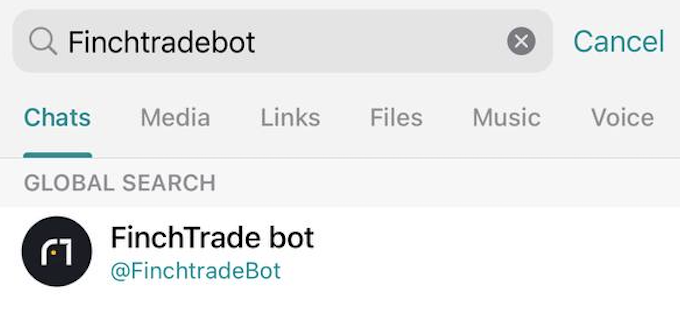
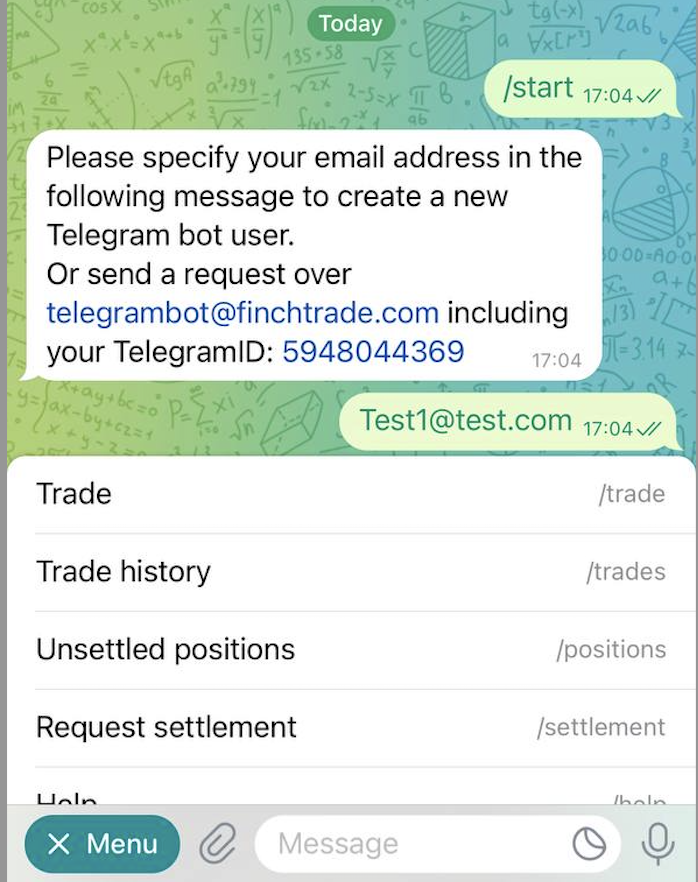
1\) Find [@FinchtradeBot](https://t.me/FinchtradeBot) in Telegram
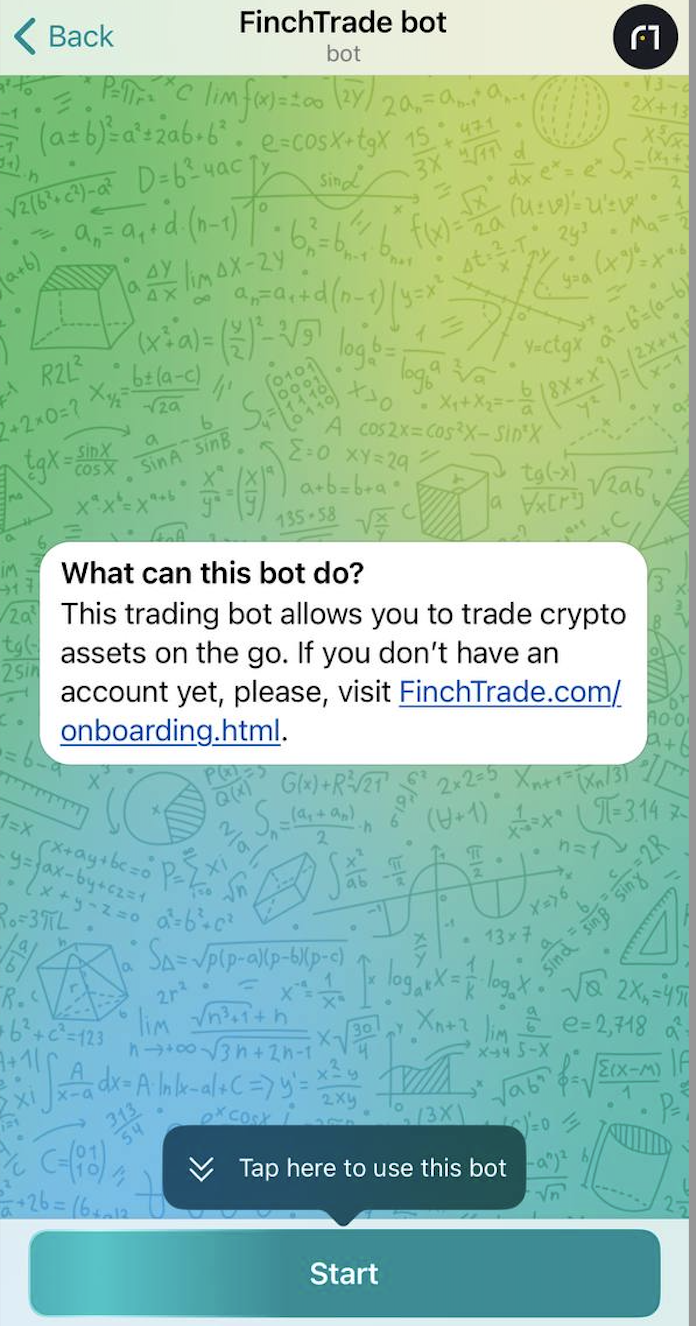
2\) Tap “Start” to initiate the process
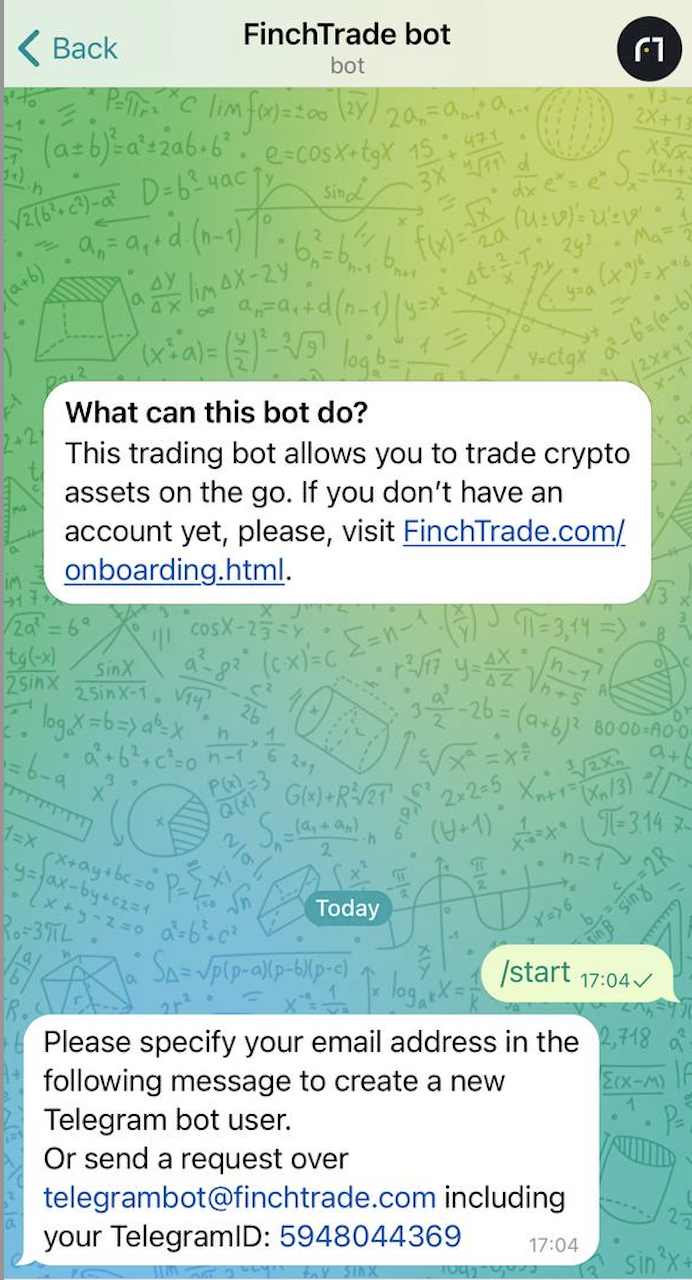
3\) Follow the instructions from the system message
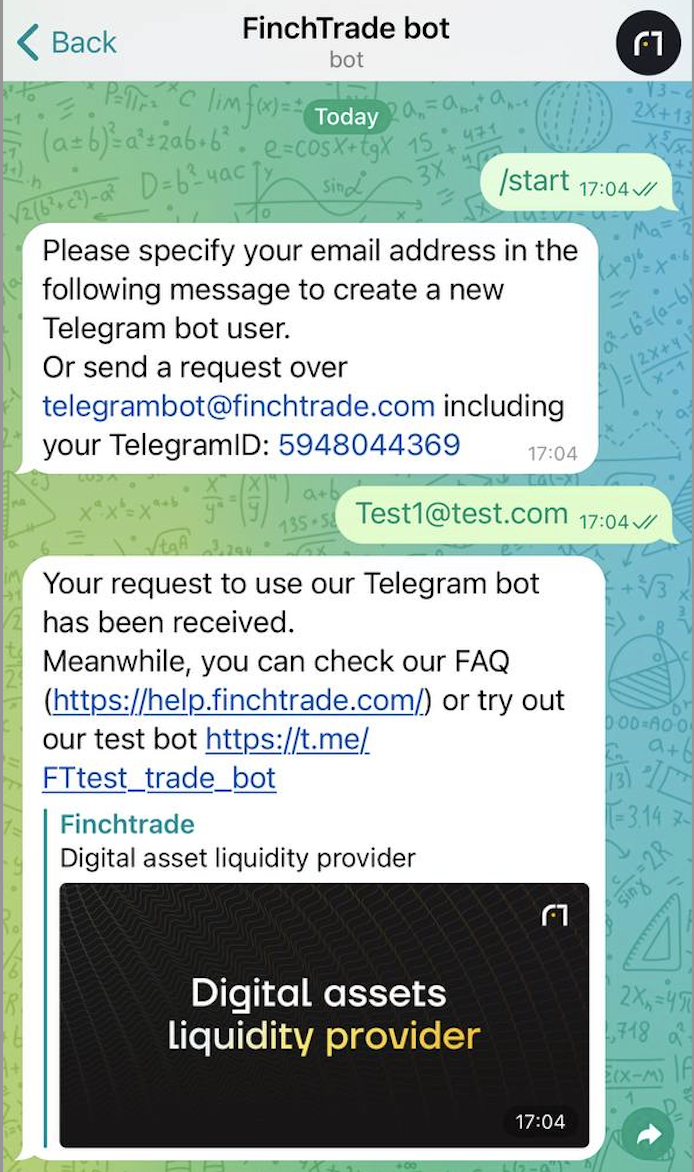
4\) We will process your request and inform you accordingly once the setup is completed on our end.
5\) Once you’re all set up, you can choose “Trade” from Menu
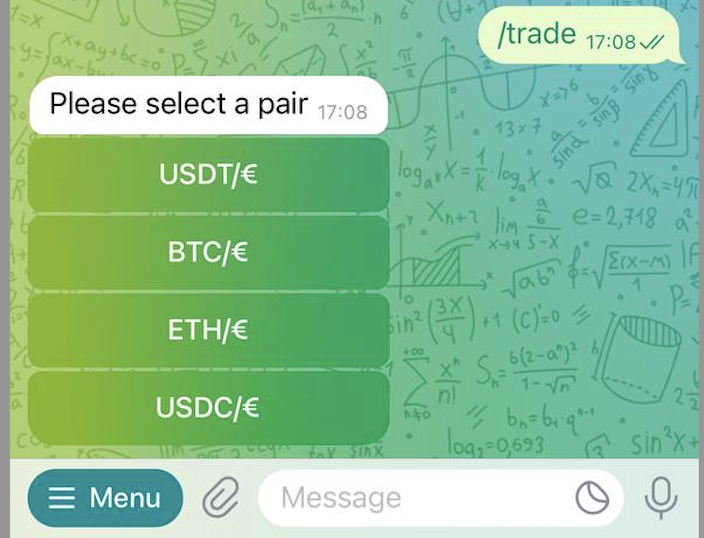
6\) You may choose a pair you’re willing to trade
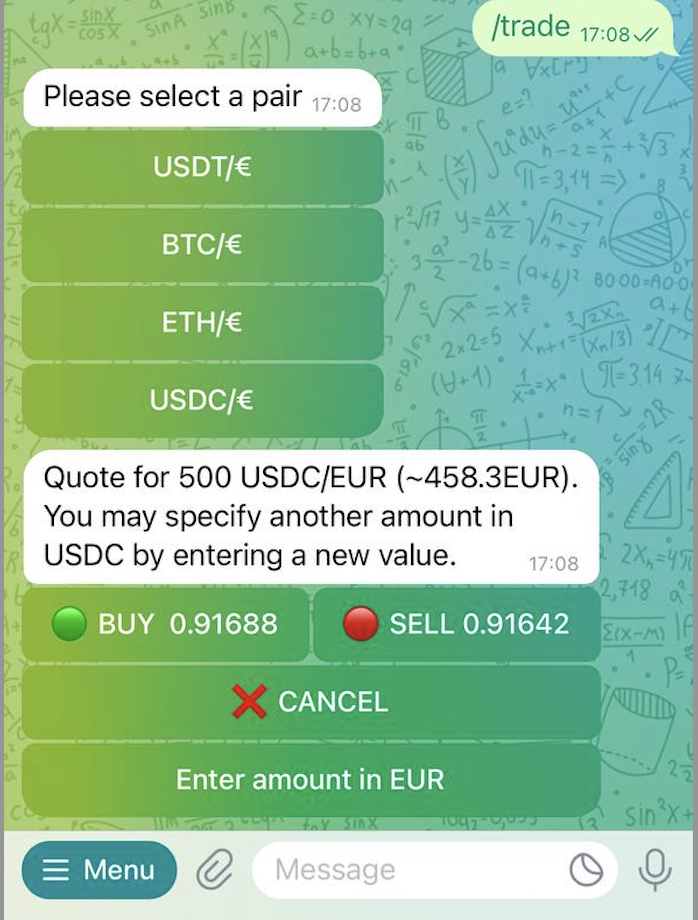
7\) Once you choose a pair you will be provided with a quote for a basic trade size. To conclude a trade just tap the respective button. You can either accept the quote and proceed with Buy or Sell, or Cancel the quote.
8\) To adjust the quote size just send the new size in the chat
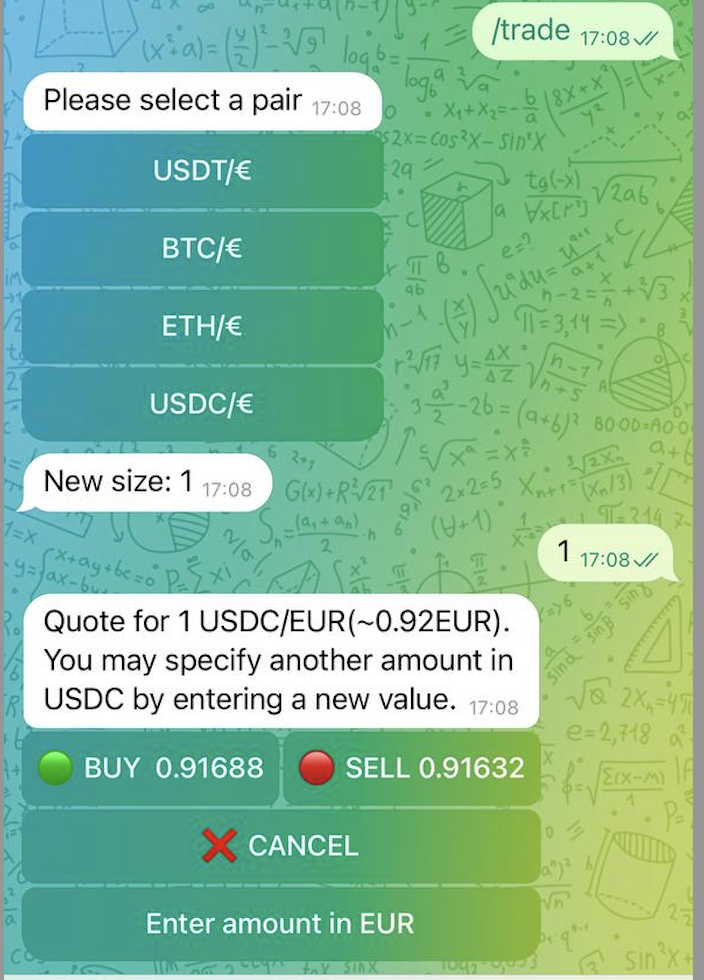
9\) Once you conclude a trade you will receive confirmation in the chat and the updated positions
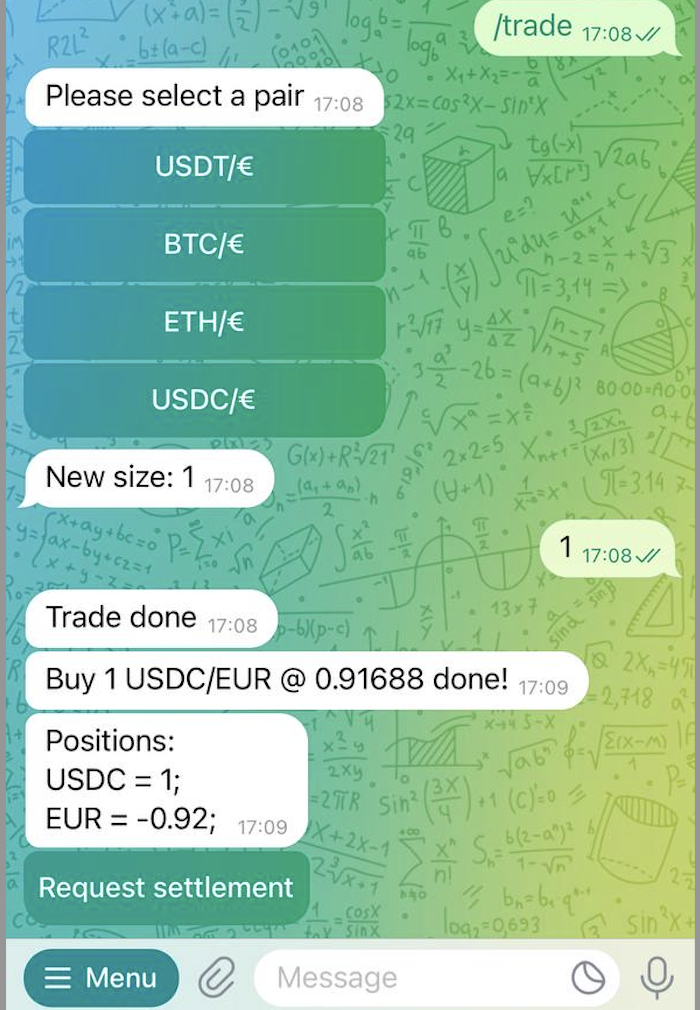
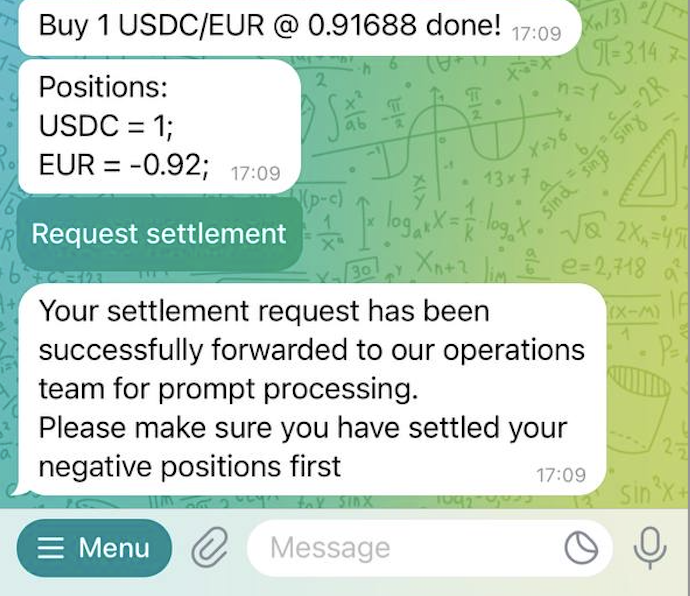
10\) If you have open positions, you can request settlement by tapping the corresponding button on the screen or in the Menu. Our operations team will receive the request and proceed accordingly.
**Reminder: you need to settle your positions first so we could deliver our positions to you.**
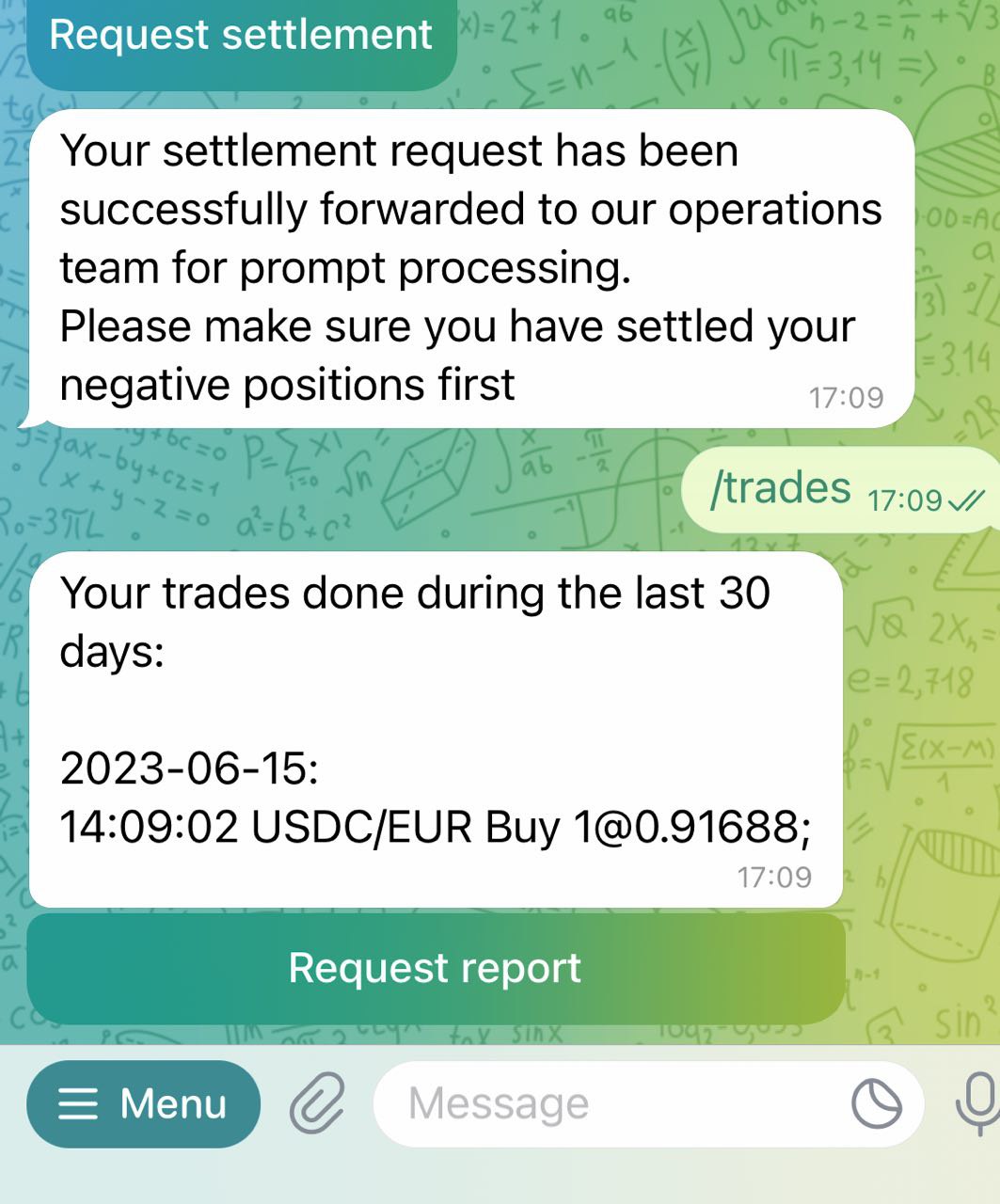
11\) You may request trades history by tapping the relevant button in the menu. You will receive the last 30 days' history in the chat and the full history to your email.
# For Referral Partners
Bring your clients and earn with us up to 30% of trading fees.
#### I don’t want to lose contact with my clients. What are my options?
If you want to stay in contact with the clients you have referred to FinchTrade, you are more than welcome. Upon client consent, we will allow you to be involved in client communication.
#### How can I become a referral agent?
To become a referral agent of FinchTrade, you need to follow the easy steps:
1. Sign up on our website:
1. [Legal entities](https://app.finchtrade.com/auth/agent/sign-up?counterparty_type=company)
2. [Individuals](https://app.finchtrade.com/auth/agent/sign-up)
2. Pass light KYB/KYC online
3. Accept our T\&Cs
4. Invite your clients, see their trading activity, and earn with us!
#### What are the benefits and requirements of becoming a FinchTrade agent?
FinchTrade Introducing Agent Program lets you earn up to 30% revenue share by referring clients.
Benefits:
* Set your own profit margins per client
* Earn monthly payouts
* Track activity via a personal dashboard (onboarding status, trading activity, accrued referral fee & more)
* Access support and promo materials
Learn more about our referral program on our [website](https://finchtrade.com/introducing-referral.html).
#### Can I reuse the same link for more invites as an agent or do all invited clients need individual links?
Every client needs their own unique invite link — the same link cannot be used for multiple invites.
#### Do referred clients pay an onboarding or setup fee?
Yes — an onboarding/setup fee applies. The exact terms depend on the arrangement, so please confirm the details with your account manager.